
Channel tutorial
A channel integrates once for every merchant it will provision. Those merchants sign in to the channel’s product, not Maxana, and they do not use this portal or a Maxana dashboard.
The whole path
Section titled “The whole path”- Activate the channel-owner account and store both values that flow shows you: the first channel key, and the base URL beside it.
- Provision the merchant.
- Drive that merchant’s PayPal onboarding.
- Register one group webhook endpoint.
- Create its checkout session.
- Add checkout to the merchant experience.
- Operate refunds, statements, and fee sharing.
The group endpoint is numbered before the checkout steps, but register it even
earlier — before you start a merchant’s onboarding. Onboarding is already an
event: starting it moves the merchant into progress and raises
merchant.onboarding_updated, the first event the tutorial later tells you to
reconcile from. The endpoint is channel-level and needs no merchant, so nothing
stops you from registering it the moment your credential works. An event raised
while no endpoint is subscribed is retained rather than delivered, and getting
it afterwards takes an operator — so a channel that onboards or takes a payment
before the endpoint exists has to ask us for the events it already missed.
Before step 3, have the two PayPal sandbox accounts the walk needs: the business account the merchant connects, and the personal account the buyer pays with. Which one you connect decides whether a capture is possible at all, so it is a prerequisite rather than a detail of step 3.
Receive the first channel key
Section titled “Receive the first channel key”Maxana emails the channel owner an activation link. The owner opens it, sets a password, and that page shows the first working channel API key. There is no second email, no administrator step, and nothing here for you to build: the owner’s browser generates its signing key and redeems the credential during the same visit.
The form asks for three things, and the first one surprises people: a Name, already filled in from the invitation and editable; a Password; and that password again. The password must be at least 8 characters and carry an uppercase letter, a lowercase letter and a digit. It is also refused above 72 UTF-8 bytes, which a long passphrase reaches sooner than its character count suggests — an accented letter or an emoji costs more than one byte.
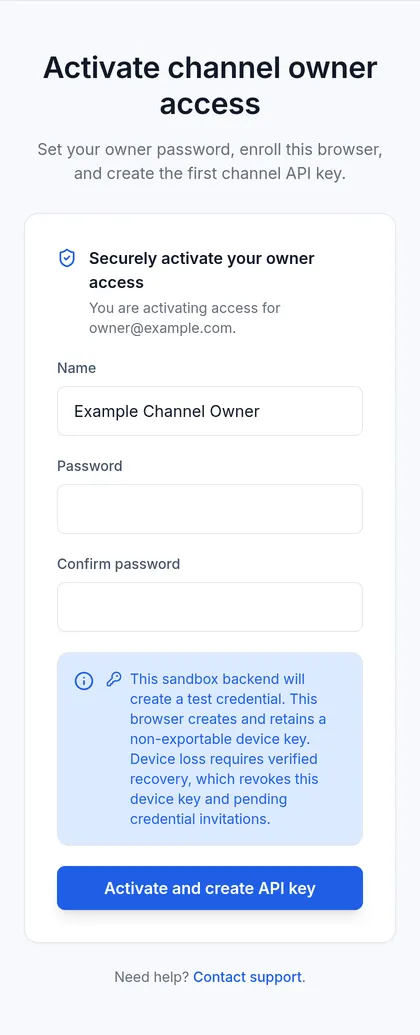
Captured against the sandbox backend, which is the only environment this page has been photographed in. One sentence differs between environments and it is the one shown: sandbox reads This sandbox backend will create a test credential, production reads This production backend will create a live credential. Read that sentence before setting the password; it is how the owner confirms which environment the first key will belong to. Nothing else on the screen changes.
Submitting sets the password, enrolls the device key, and redeems the invitation in one step, so the key arrives on the next screen.
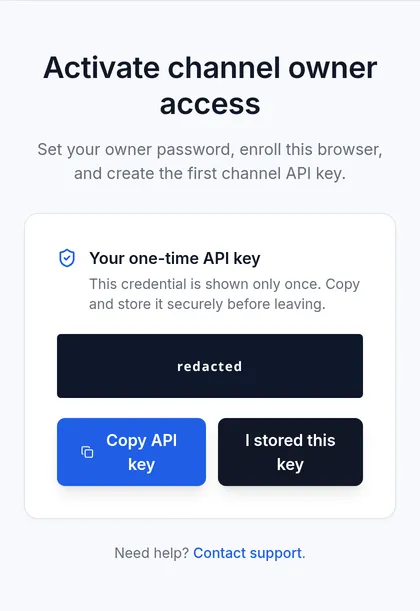
Also captured against the sandbox backend. Nothing in this panel is environment-specific, though: the key itself is covered here, so the portal publishes no credential, live or test, and everything else is what the owner sees in either environment. The still was taken before this screen published the base URL: the live panel adds the base beneath the key and names it both in the note above and on the final button, while the key, its heading and its copy button are as shown.
Copy the key, and the base URL shown with it, onto a trusted server before leaving that page. The activation link is spent the moment it is used, so reopening it does not bring the key back — it reports an invalid link. What survives is the page itself: for 10 minutes it can ask for the same key again without a new invitation, which covers a failure mid-flight but not a closed tab. After that, only an operator can issue a replacement. Keep two active keys during future rotations so revoking one does not lock the channel out.
Which host you are talking to
Section titled “Which host you are talking to”Every call in this tutorial goes to one base URL, and the activation screen shows you yours. It is the panel headed Your API base URL, under the one-time key, with a copy button of its own. Store it with the key and in the same place: neither is any use without the other, and the screen that can return the key inside its recovery window returns the base as well.
That base is a property of your credential. A channel key authenticates against the one deployment that issued it and is refused by every other, which is why the screen names your base rather than sending you to choose from a list.
Environments is that list, and it is accurate: those are the
hosts the browser SDK’s environment option resolves. It is not the answer to
this question. A credential issued for any other deployment matches neither of
them, and the screen that issued the credential is what says so.
Nothing in a failure separates the two ways of getting this wrong. A good key
sent to the wrong base and a bad key sent to the right base both answer 401
with the same body, {"detail":"Invalid API key"}. Read that as “wrong base or
wrong key”, and settle the base first: it is the cheaper of the two to be
certain about. The credential check
below settles it in one call.
Every request below writes the base as
https://staging.api.maxanapay.com. Substitute the base issued with your own
key before running any of them.
Prove the credential before building anything
Section titled “Prove the credential before building anything”GET /api/channel/merchants is the cheapest call that needs the credential and
nothing else — no merchant, no body, no header beyond authorization. Run it
first.
curl --request GET \ --url 'https://staging.api.maxanapay.com/api/channel/merchants?limit=50' \ --header 'Authorization: Bearer sk_test_replace_me'{ "total": 1, "limit": 50, "offset": 0, "merchants": [ { "merchant_id": "b3f1c8de-7a20-4c55-9e64-1d8f2a6b40c7", "business_name": "Example Store", "email": "owner@example.com", "country_code": "US", "onboarding_status": "pending", "paypal_connection_status": "not_linked", "paypal_status_reason": null, "payments_enabled": false, "created_at": "2026-01-15T09:00:00Z" } ]}A 200 — including {"total":0,"limit":50,"offset":0,"merchants":[]} on a
channel that has provisioned nobody yet — means the base and the key agree, and
every later failure is about the request you just changed. A 401 means they do
not, and nothing further in this tutorial will work until they do.
Sandbox access is issued by Maxana
Section titled “Sandbox access is issued by Maxana”Sandbox is not self-service. Ask us for access and we issue the first sandbox channel API key and tell you the base URL to use with it. There is no signup, and nothing you can call mints that first key — minting the ones after it is yours, below.
Merchants are yours to create from there — POST /api/channel/merchants works
in sandbox exactly as it does in production, so do not wait on us for those.
Have the two PayPal sandbox accounts before you start
Section titled “Have the two PayPal sandbox accounts before you start”A sandbox capture needs two PayPal sandbox accounts, not one, and neither can be created inside the flow that needs it. Both live in the PayPal Developer Dashboard under Testing Tools, Sandbox Accounts. Ask us for both at the same time as the key and you skip what follows: the accounts we hand you are the ones we can look at with you when something goes wrong.
The business account is the one your merchant connects through the
action_url. Create it in the Developer Dashboard before you start
onboarding, and sign that account in when PayPal’s page opens. Do not use the
sign-up path offered inside that page, however prominent it is — and it is the
obvious move the moment the account you were given turns out to be taken. An account created there reaches the end
of onboarding with its email address unconfirmed, and PayPal will not be paid
into a sandbox account whose email it has not confirmed: PayPal’s last screen
asks the merchant to confirm the address from a link it emails, and that mail is
readable only from the Developer Dashboard that owns the account — which, for an
account created that way, is not one you hold. The merchant then looks ready
enough to charge in the status
read, the buyer
approves at PayPal, and the capture is refused. It is not a state you can wait
out, and it is the single most expensive way to lose a day here.
The personal account is the one the buyer signs in with at checkout. A business account cannot pay, so without a personal one the seller onboards, the session opens, the PayPal window appears — and the payment cannot be completed, which reads exactly like a broken integration and is not one.
Sandbox and production credentials are not interchangeable. Each environment refuses the other’s keys, and merchants, checkout sessions, and identifiers do not cross between them.
What each credential can reach
Section titled “What each credential can reach”The owner session and the channel key are not interchangeable, and neither reaches the Maxana console.
The owner session exists to claim the first credential and to manage the owner’s own identity key, including replacing that key with one signed by its predecessor. It operates nothing — it does not list merchants, read statements, mint API keys, or reach any other channel route, and every administrative route refuses it. It expires in fifteen minutes.
Losing the device is the case the session cannot serve, because signing with the predecessor is exactly what a lost device makes impossible. Recovery runs on an emailed token and the owner’s password instead, and the email is sent by an operator, so ask us rather than looking for a way to start it yourself.
The channel key is what operates the channel afterwards — every endpoint in this tutorial. It is refused by every administrative route.
The sandbox and production backends each fix their own credential environment. An administrator or owner cannot select it. After activation, the administrator can send a replacement email only when that backend has no usable key and no live pending invitation.
The sk_ prefix does not reveal whether a key is merchant-scoped or
channel-scoped. The server decides from the credential record. A channel-level
operation derives the channel from the key. A per-merchant operation also
requires X-Merchant-Id, and Maxana verifies that merchant belongs to the
calling channel.
Mint and revoke your own keys
Section titled “Mint and revoke your own keys”After the first key, the channel manages its own credentials without us.
POST /api/channel/api-keys mints another and returns its plaintext once;
GET /api/channel/api-keys lists them, revoked ones included, because which
key was live when is part of the record; POST /api/channel/api-keys/{id}/revoke
kills one immediately and permanently.
A channel holds at most twenty active keys. The twenty-first is refused with
400 and Too many active API keys. Revoke unused keys before creating another one. Revoked keys do not count, so rotating never approaches the limit;
accumulating unrevoked ones does.
Minting is also rate limited, to 10 per 1 minute per credential.
Exceeding it answers 429 with a
body whose one key is error — not
the detail every other error on this API uses — and no header
saying when to come back. Errors and rate
limits publishes the budget on every
operation this tutorial uses, and what to do instead of reading a
Retry-After.
Rotate in that order — mint, deploy, revoke — and never the reverse. Both keys work in between, which is what keeps the integration up between the response and your deploy.
A channel may revoke the key it is calling with, including its last one. That locks it out until an operator issues a new invitation and the owner redeems it again. This is deliberate: a leaked credential is worth more urgency than a locked-out integration.
Production behavior expectations
Section titled “Production behavior expectations”Every timing and behavior expectation on this page describes production;
sandbox is for exercising requests, and its timings are not representative.
Treat API responses, browser redirects, and webhooks as independent signals,
and reconcile durable state explicitly. Reconcile with
merchant.onboarding_updated and the status read; never treat a browser return
URL as the completion signal.
Scope model
Section titled “Scope model”Channel-level operations derive the channel from the key; do not send a
client-selected channel identifier. Per-merchant operations pair the channel
key with X-Merchant-Id. Provisioning ownership also comes from the credential,
never from a request-body channel ID.
Current limits
Section titled “Current limits”A channel key cannot use direct-merchant self-service routes. The channel’s merchant has no Maxana login and cannot rotate channel keys, configure the group webhook, or complete these integration steps on the channel’s behalf.
Provision a merchant
Section titled “Provision a merchant”Create a merchant with POST /api/channel/merchants; ownership is derived from
the channel key. Continue to the provisioning step.
Merchant provisioning and onboarding
Section titled “Merchant provisioning and onboarding”Create a merchant with POST /api/channel/merchants; ownership is derived from
the channel key.
Start that merchant’s provider onboarding with
POST /api/channel/onboarding/start, pairing the channel key with the required
merchant header. Continue to PayPal onboarding.
Use the status operation and onboarding webhooks to reconcile readiness.
Connect PayPal
Section titled “Connect PayPal”The merchant completes PayPal’s consent flow from the action URL your channel opens. The onboarding step explains the branding the merchant observes and the signals that indicate readiness.
Merchant checkout integration
Section titled “Merchant checkout integration”Use the canonical maxanapay.js integration guide at /integration/maxanapay-js/.
The channel-specific checkout-session and browser checkout steps keep merchant scope explicit.
When a buyer approves but the capture never follows, the channel completes it
server-side: POST /api/payments/orders/{order_id}/capture with the channel key
and X-Merchant-Id captures that merchant’s approved order. Re-capturing an
already-captured order returns the existing capture (200); a failed, refunded,
or voided order is refused 409; and an expired checkout session does not block
this authenticated call. The browser checkout step
covers when this happens and how to retry it safely.
Webhooks
Section titled “Webhooks”Continue to the channel webhook step for the one group endpoint and one group signing secret.
Fees and refunds
Section titled “Fees and refunds”Continue to refunds, statements, and fees.
Statements and reconciliation
Section titled “Statements and reconciliation”Channel statements are exposed by the curated statement operations. Each issued statement is a closed-period reconciliation record for one currency; its line operation supplies the underlying merchant transactions.
API reference
Section titled “API reference”Continue to the curated API reference to look up exact request, response, and security shapes.
What breaks first
Section titled “What breaks first”- A per-merchant call without
X-Merchant-Idreturns401. - An unknown request field returns
422instead of being ignored. - Re-serializing a webhook body makes its signature fail.
- A newly added event type is not added to an existing endpoint subscription; update the complete event-type list.
- A merchant can finish PayPal onboarding without returning to the channel’s
browser URL; use status and
merchant.onboarding_updated. - A merchant whose chosen PayPal account is already linked to another Maxana
merchant is refused the link, and the status read can look as though nothing
is wrong —
paypal_status_reasonispaypal_account_already_linkedand is the only field that says the link was refused.{"reconnect": true}does not resolve the conflict by itself. The merchant onboards a different account, or Maxana releases the existing link. - Creating an order with a channel key is refused: a new order needs a fresh
buyer approval, so order creation stays merchant-only. Capturing one an
approved buyer left uncaptured is not — a channel key paired with
X-Merchant-Idrecovers it. The buyer surface itself uses the session capability and no secret key. - An inactive channel cannot provision a new merchant, while already-provisioned merchants continue operating.
- Revoking the last active channel key locks the channel out until the channel owner accepts another invitation.
- Pricing, fee-share terms, sender identity, and the onboarding return location are agreed channel settings, not fields the channel key can change.